Email is a conversation; SMS is a connection. With near-instant read rates, SMS is the most direct way to reach customers where they are. For organizations using Salesforce, the real advantage comes from how it fits into your workflow.
By sending bulk SMS straight from Salesforce, your CRM becomes more than just a record-keeping tool it turns into an engine for real engagement. Teams can send high-volume messages directly from the data, reports, and automations they already rely on, without constantly switching between apps.
In this guide, we’ll walk through practical ways to send bulk SMS from Salesforce, showing how to integrate messaging smoothly into your everyday processes.
Methods to Send Bulk SMS from Salesforce
1. Sending Bulk SMS via Salesforce Campaigns
If you’re running a bigger marketing push, campaigns are where SMS really shines. They help you keep your audience organized and see what’s actually working.
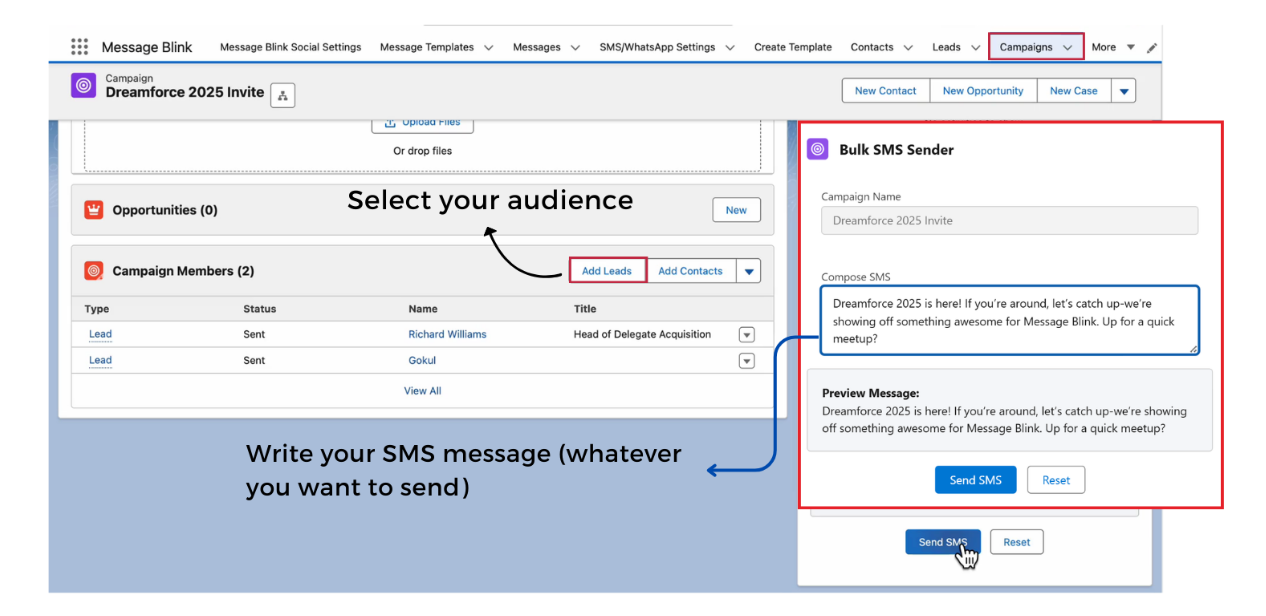
Step 1: Create or Select a Campaign
Start by creating a new Salesforce Campaign or opening an existing one.
Step 2: Add Contacts to the Campaign
Add the Contacts or Leads you want to message. You can do it manually, import a list, or use your segments to grab the right folks automatically.
Step 3: Draft and send your SMS in bulk
Using a 100% native Salesforce messaging app, draft your SMS. Once everything looks good, click on send sms.
Doing it this way means your SMS isn’t just floating around; it’s part of your campaign. You can track opens, clicks, and responses in one place, making your job much easier.
2. Workflow Automation & Flow-Based Messaging
Automation lets you send messages automatically instead of doing it by hand. With workflows or flows, you can have SMS go out as soon as certain conditions are met, with no extra clicks needed.
Common examples include:
- Sending confirmations after record creation
- Notifying customers when status fields change
- Triggering reminders before deadlines
With flow-based messaging:
- Communication becomes consistent and timely
- Manual effort is reduced
- Messaging scales without operational bottlenecks
This method is particularly effective for transactional or lifecycle-driven communication.
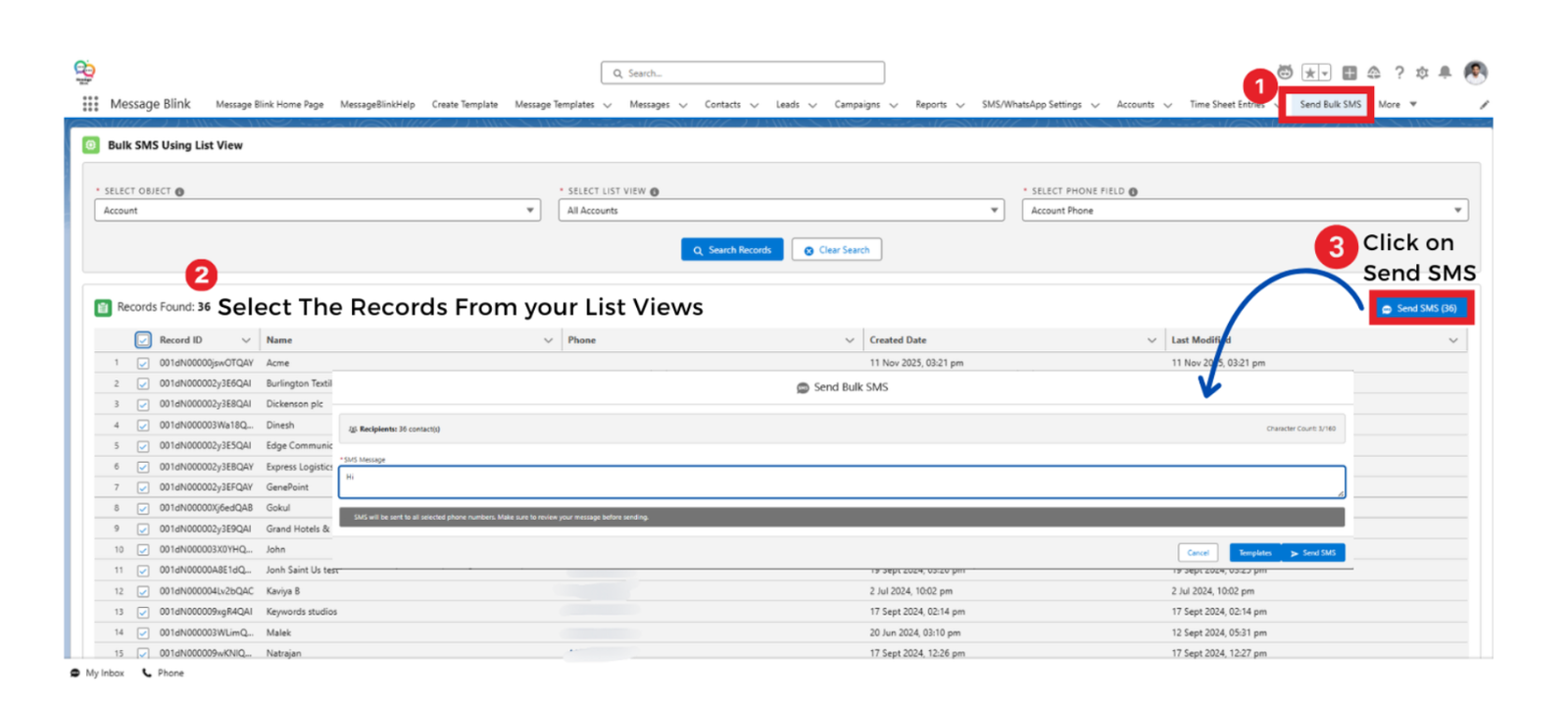
3. List View-Based Bulk Messaging
If you need to reach a group of people quickly, list views are super handy. You don’t need to set up a whole campaign just filter and go.
Step 1: Go to the Relevant Object
Click on the Contacts, Leads, or any custom object from which you want to send SMS.
Step 2: Create or Select a List View
Create a custom list view using filters, or choose an existing list view.
Step 3: Verify Required Fields
Ensure the list view includes the Object name, List View, and the relevant Phone field necessary for messaging.
Step 4: Select Recipients and Initiate Bulk SMS
Select the records and click on the “Send Bulk SMS” option.
Step 5: Draft and Send the Message
Draft your text, review it and click “Send SMS.”
This method is great for quick updates or urgent messages; you can reach the right segment fast without any extra setup.
4. Bulk SMS from Reports
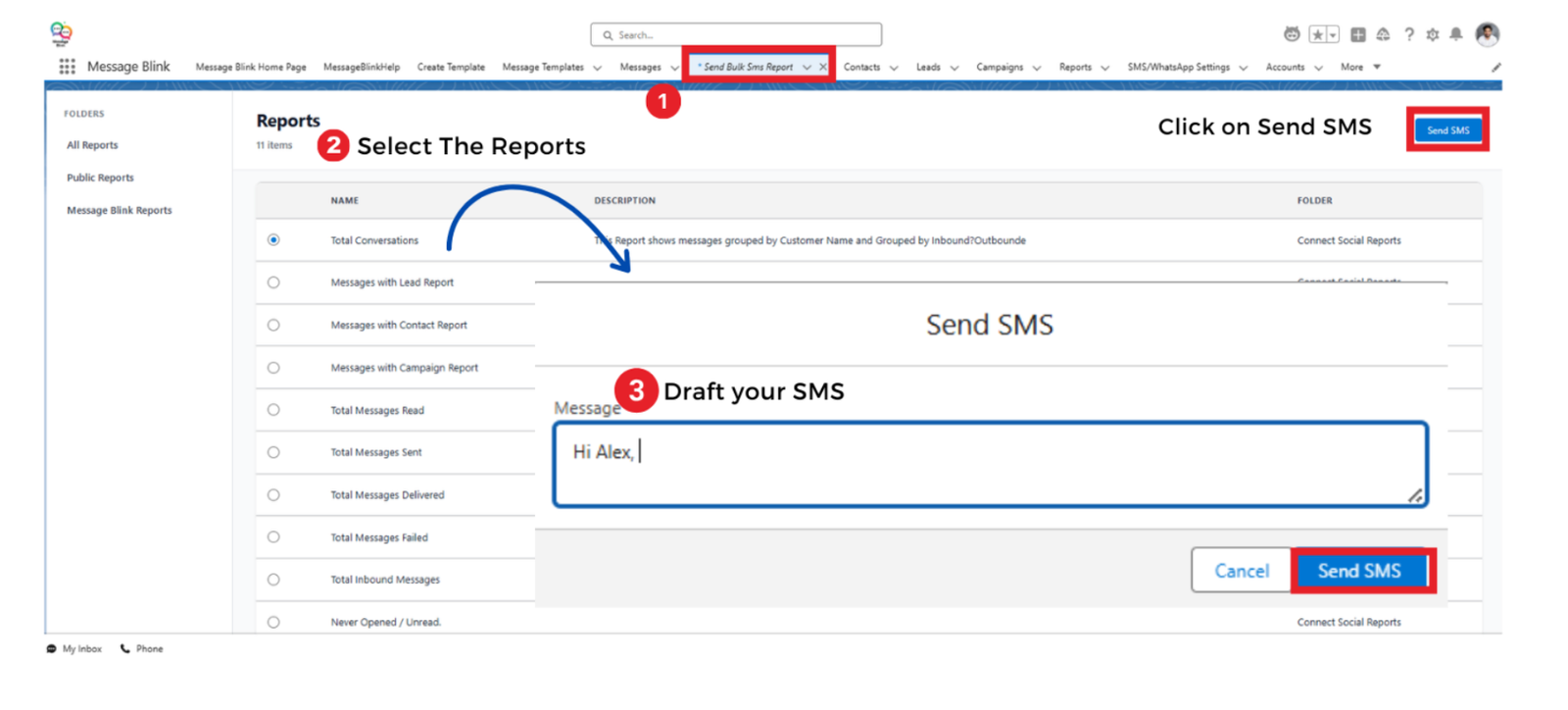
If you want to send messages based on real data, reports are the way to go. You can pick exactly who to reach using the filters you’ve already set up.
Step 1: Open the Report Folder
Go to the folder that contains the reports relevant to your objective.
Step 2: Select the Specific Salesforce Report
Select the report that lists the records you want to message.
Step 3: Write and Personalize the SMS
Draft your message in the message composer. Merge fields can be used to dynamically personalize content, such as inserting the recipient’s name or other record-specific data.
Step 4: Send SMS
Once you’ve looked it over and everything seems right, hit send. That’s it.
Doing it this way keeps things simple, you’re using data you already trust, and your messages go to the right people without extra work.
Using Native SMS Apps from AppExchange
While Salesforce provides strong data management and automation capabilities, SMS functionality is typically extended through integrations available on the Salesforce AppExchange, such as Message Blink, SMS-magic, mogli etc.
Native apps available in the marketplace allow organizations to:
- Send messages directly from CRM records
- Use automation and flow triggers
- Track delivery and engagement
- Log communication against customer profiles
Selecting a CRM-native SMS app ensures messaging activity remains embedded within Salesforce workflows rather than operating as a disconnected external process.
Conclusion
Sending bulk SMS from Salesforce just makes life easier. You can reach your contacts quickly, keep everything in one place, and not have to switch between tools all the time.
You’ve got a few ways to do it: Campaigns if you want it structured, Flows if you want automation, List Views for quick hits, or Reports if you want to be smart about who you’re messaging. The point is, Salesforce makes it simple to send lots of messages without losing track of anything.
The trick is to make SMS just another part of your usual workflow. When it’s built into Salesforce, you can tell who’s been contacted, keep your records organized, and stay compliant without having to jump through hoops.