Search index types in Data Cloud play a key role in how AI finds and uses your data. If the search brings back the wrong data, AI answers don’t help. However, if it finds the right data, everything works better. This blog explains how search indexes work in Data Cloud and how to choose the right one.
Why Search Matters for AI in the Data Cloud?
AI works best when it uses customer-specific data, because generic information often misses context.
Data Cloud allows AI to use:
- Structured data
- Semi-structured data
- Unstructured data, like knowledge articles and documents
When someone asks a question, Data Cloud searches your CRM data first. Tools like Agentforce, Tableau, and Flow Builder then use that data to produce answers that match what the user actually meant.
This improves:
- AI response accuracy
- Analytics insights
- Automation results
Search Index Types Available in Data Cloud
You can build search indexes on almost any data in Data Cloud, including unstructured content.
There are two search index types:
- Vector Search
- Hybrid Search
Both use the same data, but they search it in different ways.
How Data Cloud Prepares Data for Search?
Before the search actually does its job, Data Cloud does a lot of prep work behind the scenes.
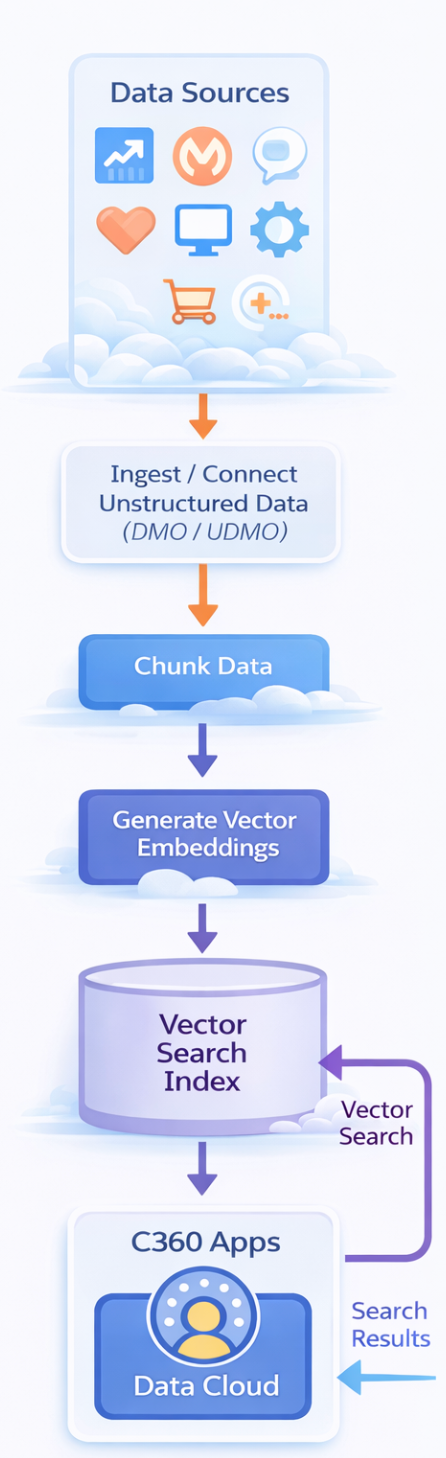
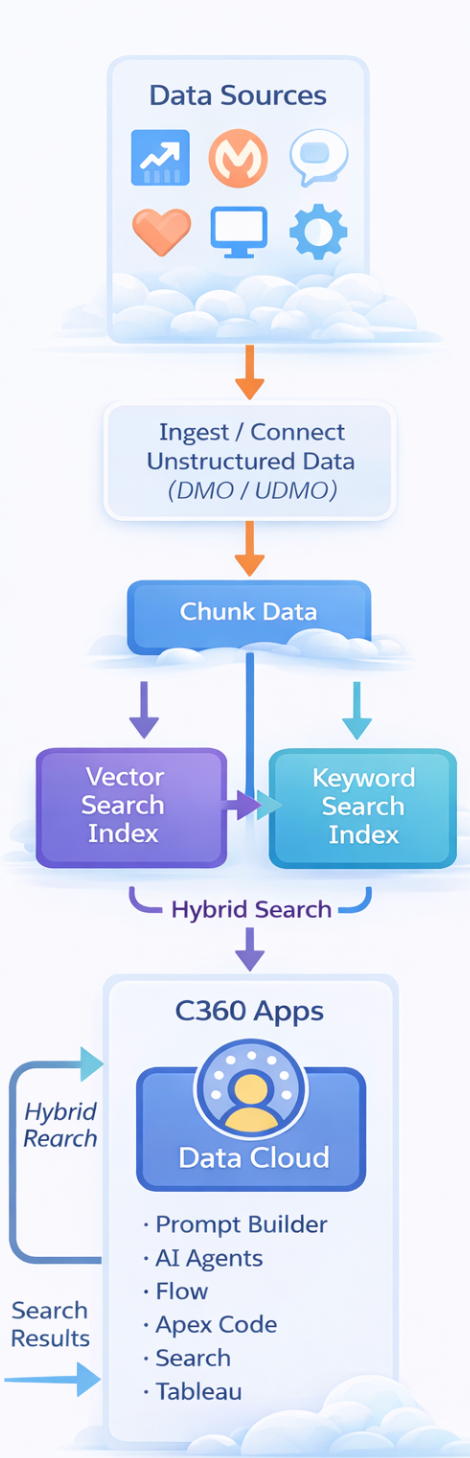
It starts by bringing data into the Data Cloud from different sources. If the data is unstructured, it gets mapped to DMOs or UDMOs, so it has a clear structure. Once that’s done, the data is broken down into smaller, meaningful chunks that are easier to understand.
From these chunks, Data Cloud creates vector embeddings. Think of these as smart representations of the data that capture its meaning, not just the words. When a search runs, these embeddings help Data Cloud compare both context and keywords, which is how it delivers more accurate and relevant results.
Choosing the Right Search Index Type
The right approach really depends on how people ask questions. Some questions are broad and descriptive, while others use very specific words, names, or terms. That difference is exactly where the two search types come into play.
Vector Search Index Type
Vector search, often called semantic search, focuses on meaning rather than exact word matches. The data is first broken into smaller chunks, and each chunk is converted into a vector. When a user asks a question, that question is also turned into a vector. The search then compares these vectors and returns the chunks that are closest in meaning
Vector search can work with:
- Text
- Audio
- Video
- Call transcripts
It works best when questions are longer and more descriptive. For example, a question like: “How does the Google Chrome internet browser work?”
Data Cloud ranks results based on how closely their meaning matches the question. The highest match appears first.
Hybrid Search Index Type
Hybrid search brings together the best of both worlds: vector search and keyword search. This is important because vector search is great at understanding meaning, but it struggles with numbers and domain-specific terms. Keyword search handles those well, even though it doesn’t understand context. By combining both, hybrid search delivers more accurate and balanced results.
How Hybrid Search Works?
Data is chunked the same way as vector search. Vector embeddings are created.
Two indexes are built:
- One for vector search
- One for keyword search
In hybrid search, both search types run at the same time. A fusion ranker then brings the results together and ranks them. This ranking is trained using real search queries from Einstein Search and generative AI tools, which helps ensure the most relevant results surface first.
When Hybrid Search Is Better?
Hybrid search is a better choice when:
- Questions are long but include specific terms
- Domain language or product names matter
- AI responses must be very accurate
Using the same Google Chrome example, hybrid search returns:
- General browser information
- Chrome-specific details
This gives AI better grounding than vector search alone.
Hybrid Search Ranking and Autodrop
Hybrid search improves quality in two ways.
Fusion ranking takes results from both keyword and vector search and orders them by relevance. On top of that, Autodrop filters out results where relevance suddenly falls off. This helps keep low-quality data from slipping into AI prompts and RAG use cases, ensuring more reliable and accurate outputs.
Also Read – What is RAG in Salesforce?
Running Searches and Using Results
You can create, delete, and manage search indexes using the search index UI and APIs.
After an index is ready:
- You can run vector searches using the Query API.
- You can also run hybrid searches using the Query API.
- Hybrid queries can include filters and joins
The same indexes can be used by:
- Prompt Builder
- AI agents
- Tableau
In Tableau, vector search allows analysis based on meaning, not just keywords.
Also Read – ContentDocument and ContentVersion in Flows | Spring ’26
FAQs
1. Why does Hybrid Search usually work better for AI answers?
Most real questions are mixed. People use normal language and also add specific terms. Hybrid Search looks at both, which helps AI pick better data.
2. Do different Salesforce tools need different search indexes?
No. AI agents, Flow, and Tableau can all use the same search index, so everything works with the same data.
Conclusion
Search indexes are the foundation of AI accuracy in Data Cloud. Vector search works well for long, general questions where meaning matters most. Hybrid search works better when questions include both meaning and specific terms. Choosing the right search index helps AI deliver clearer answers, better insights, and more reliable automation using your own data.
Get a complete Roadmap To Learn Salesforce Admin and Development👇