In Salesforce, hardcoding values within Apex classes, validation rules, or flows can quickly become a headache when those values need to change. Imagine maintaining discount percentages, API endpoints, or business rules across multiple environments and updating them manually each time is not only tedious but also error-prone. This is where Custom Metadata Types in Salesforce come into play.
In this blog, we’ll explore what Custom Metadata Types are, why they’re useful, and walk through a real-world example with step-by-step guidance so you can start applying them in your own Salesforce projects.
What are Custom Metadata Types?
Custom Metadata Types are a powerful feature in Salesforce that lets you store configuration or setup information, rather than business data. Think of them as custom objects, but designed specifically to hold settings or rules that control how your application behaves.
Let’s understand with an example:
Imagine you’re building an app that calculates shipping fees based on the country. Instead of writing different shipping rules inside Apex code, you can create a Custom Metadata Type called “Shipping Rules” and store country-wise fee data as individual records. This way, if the rules change, you don’t need to modify the code; you just update the metadata record.
Unlike regular custom objects:
- You don’t need to write triggers or DML to access records.
- You can include both the type and its records in change sets.
- You can reference them directly in Apex, Flows, and even Validation Rules.
Why Use Custom Metadata Types?
If you’ve ever found yourself updating the same value in multiple places or worrying about deployment errors when moving configuration data across orgs, Custom Metadata Types can save you a lot of time and trouble.
Here’s why they’re worth using:
- Easily Deployable Across Environments
Unlike Custom Settings or regular records, Custom Metadata records can be included in change sets. That means when you deploy your app to production, all your configuration data goes with it, and no need for post-deployment data entry.
- No DML or SOQL Limits
Since CMTs (Custom Metadata Types) are considered metadata, accessing them in Apex doesn’t count against governor limits. This makes them ideal for performance-sensitive logic that runs frequently.
- Decouples Logic from Code
Business rules and field mappings can be stored as metadata instead of being hardcoded. This makes your solutions more flexible and easier to maintain, especially when working with non-developers.
- Admin-Friendly Configuration
Admins can manage metadata records through the UI, without touching a single line of code. That opens the door for more collaborative development between devs and admins.
- Secure and Manageable
You can control visibility and access to metadata just like with custom objects, and since these records are part of the metadata layer, they’re protected from accidental deletion.
How are Custom Metadata Types Different from Custom Objects?
At first glance, Custom Metadata Types might look a lot like Custom Objects; both let you define fields and create records. But under the hood, they serve very different purposes.
Key Difference:
- Custom Objects store business data like leads, cases, or transactions.
- Custom Metadata Types store configuration data that controls how your application behaves.
Real-World Example: Region-Based Discount Setup
Let’s say your business offers different discount percentages depending on the customer’s region. Instead of hardcoding these values in Apex or Flows, we’ll use a Custom Metadata Type to store and manage them.
Objective
Create a configurable discount system where each region has a defined discount percentage and retrieve those values dynamically using Apex.
Steps to create custom metadata Type:
1. Create a Custom Metadata Type
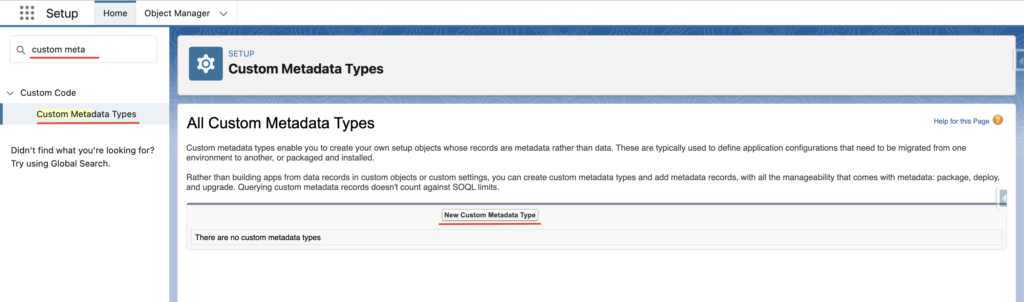
- Go to Setup → Search “Custom Metadata Types”
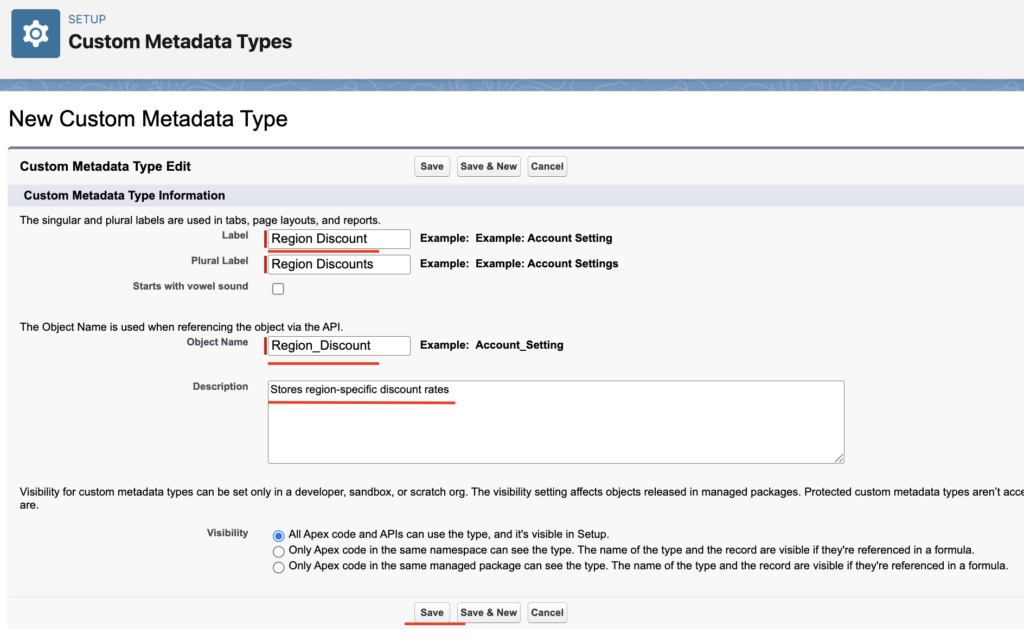
- Click New Custom Metadata Type
- Label: Region Discount
- Object Name: Region_Discount
- Description: Stores region-specific discount rates
- Click Save.
2. Create Fields
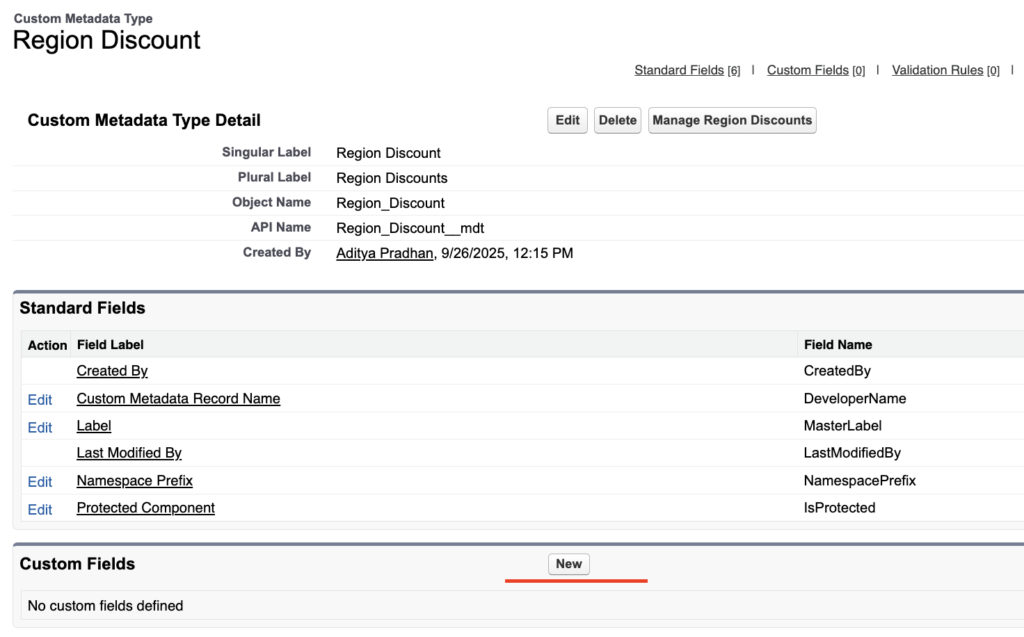
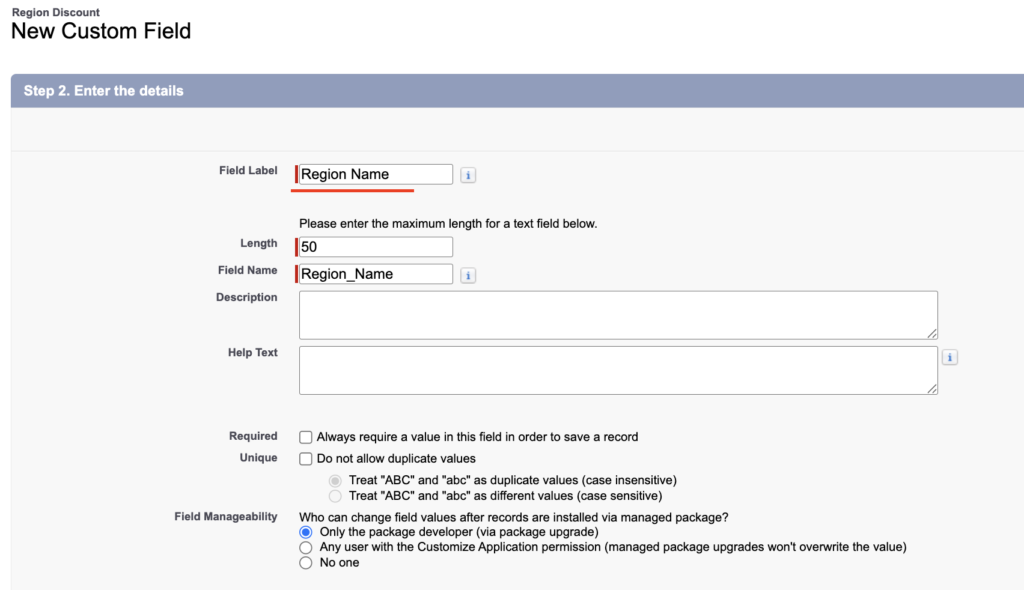
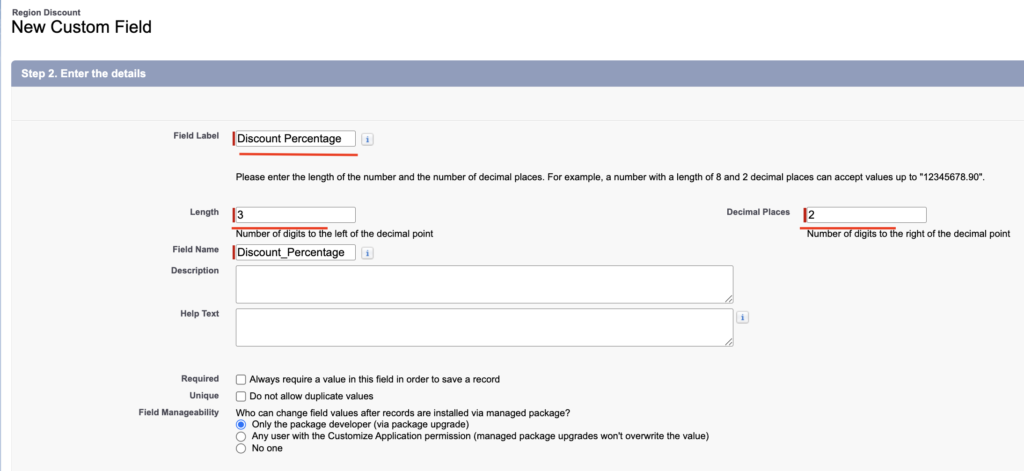
- Click New Custom Fields
- Region_Name__c → Text(50)
- Discount_Percentage__c → Number(3,2)
Add Metadata Records
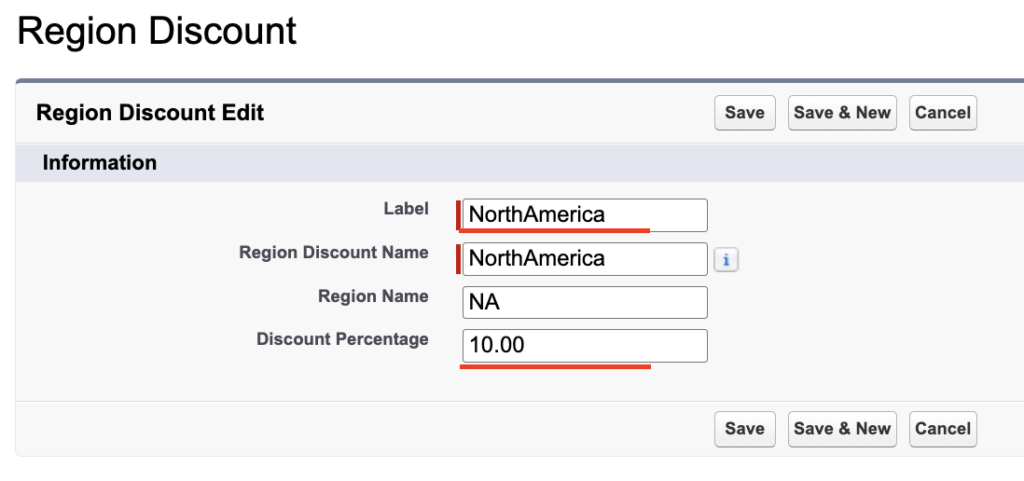
- Click on Manage Region Discounts under your newly created type.
- Click New and add records like:
| Label | Region Name | Discount Percentage |
|---|---|---|
| NorthAmerica | NA | 10.00 |
| Europe | EU | 12.00 |
| Asia | AS | 15.00 |
Each record represents a region and its respective discount.

Use in Apex
Now let’s retrieve these values using Apex and build a simple discount map:
Map<String, Decimal> regionDiscountMap = new Map<String, Decimal>();

for (Region_Discount__mdt config : [
    SELECT Region_Name__c, Discount_Percentage__c FROM Region_Discount__mdt
]) {
    regionDiscountMap.put(config.Region_Name__c, config.Discount_Percentage__c);
}

System.debug('Discount for Asia: ' + regionDiscountMap.get('AS')); // Output: 15.00
With this setup, if business rules change, you don’t need to touch the code, just update the metadata record.
Use in a Flow
You can even reference these records using Get Records in Flows by querying the Region_Discount__mdt type. This way, even your no-code automation can benefit from dynamic discount logic.
Custom Metadata Types vs Custom Settings
While both Custom Metadata Types and Custom Settings allow you to store configuration data, they’re not interchangeable. Understanding the differences will help you decide when to use which.
Here’s a side-by-side comparison:
| Feature | Custom Metadata Types | Custom Settings |
|---|---|---|
| Deployment Ready | Can be deployed with change sets | Records must be manually created post-deployment |
| Accessible in Apex | Yes | Yes |
| Accessible in Flows & Formulas | Yes | Limited to Hierarchy Custom Settings |
| Governor Limits (SOQL) | Not counted toward SOQL limits | Counts toward SOQL limits |
| Use Case | App configuration, logic, reference data | User/org-level preferences |
| Hierarchy Support | Not supported | Supported (in Hierarchy Custom Settings) |
| Security Control | Field and record-level access | Less flexible |
Custom Metadata Types Summary:
- Use Custom Metadata Types when you want:
- Version-controlled configuration
- Easy deployment between orgs
- Declarative access (Flow, Formula, Validation Rule)
- Use Custom Settings when:
- You need user or profile-specific settings.
- Deployment isn’t a concern.
Advantages of Using Custom Metadata Types in Salesforce
- Deployable Across Orgs: Include both types and records in change sets or packages, no manual setup post-deployment.
- Reusable Configuration: Reference in Apex, Flows, Validation Rules, and Formulas reduces duplication.
- No Governor Limits: Access without using SOQL or DML limits, improves performance and scalability.
- Admin-Friendly: Easily editable from the Setup UI. No developer needed for small config updates.
- Secure and Stable: Protected from end-user edits and supports field-level security.
- Perfect for Modular Design: Store environment-specific logic (like URLs, feature flags) without hardcoding.
Looking to learn Salesforce Flow? Check out the complete Salesforce Flow Mastery Course here
FAQs
1. Can Custom Metadata Types be deployed with change sets?
Yes. Both the type and its records can be included in change sets, making them fully deployable between orgs.
2. Are Custom Metadata Types counted against SOQL or DML limits?
No. Since they’re treated as metadata, accessing them in Apex doesn’t consume governor limits like SOQL or DML.
3. How are Custom Metadata Types in Salesforce different from Custom Settings?
Custom Metadata Types are deployable, don’t require DML to access, and work well in Flows and Formulas. Custom Settings are more suitable for user- or org-specific values.
4. Can I reference Custom Metadata Types in Flow?
Yes. You can use the Get Records element in Flow to query metadata records just like custom objects.
5. Can admins edit Custom Metadata records in production?
Yes. Admins can view and update metadata records directly from the Setup UI, no Apex needed.
Conclusion
Custom Metadata Types in Salesforce make it easy to manage configuration without hardcoding values. They are simple to set up, deployable across orgs, and don’t add to governor limits. By using them, both admins and developers can keep apps flexible, scalable, and easier to maintain over time.