In this blog, we will explore Salesforce’s new Agentforce for Setup. Salesforce introduced Agentforce for Setup, an AI assistant designed to help admins work faster with plain-language commands.
Instead of searching for the right page or clicking through multiple menus, you can describe what you want, and Agentforce guides you, explains configurations, and even prepares setup actions for you.
What Is Agentforce for Setup?
Agentforce for Setup is Salesforce’s new built-in AI assistant designed specifically for admins. Instead of clicking through multiple pages, remembering where everything lives, or searching for documentation, you can simply tell Agentforce what you want to do, and it helps you get there faster.
It reads your request, interprets your intent, and guides you to the right configuration or even prepares the setup steps for you. Whether you want to create a new field, fix a permission issue, understand a flow, or troubleshoot an error, you can now start with a natural-language prompt like:
- “Create a checkbox field on Account for internal review.”
- “Why can’t user Maria update Opportunity Stage?”
- “Explain what this flow actually does.”
Behind the scenes, Agentforce understands your org’s metadata, context, and relationships. That means it’s not giving random suggestions, it looks at the actual way your org is built.
Why Salesforce Introduced Agentforce for Setup?
Salesforce orgs have become bigger and more complicated, and admins often spend more time navigating Setup than actually solving problems. With so many settings, automations, and permissions to manage, even simple tasks can take longer than they should.
Agentforce for Setup was created to remove this friction. Instead of clicking through multiple menus, admins can describe what they want, and the system guides them or prepares the action instantly. It cuts down time, reduces confusion, and makes Setup easier to manage for both new and experienced admins.
Key Capabilities of Agentforce for Setup
Below are some features of Agentforce that were discussed at DreamForce 2025.
1. Natural-Language Configuration
You can create fields, update settings, or adjust objects by simply typing what you want. No searching, no hunting for the right menu, just plain English.
2. Guided Troubleshooting
When something isn’t working, Agentforce can point out what’s wrong and suggest how to fix it, whether it’s a permission gap, an automation issue, or a missing configuration.
3. Clear Explanations of Complex Setup
If you inherit a messy flow, a complicated rule, or old automation, Agentforce can explain what it does in simple language so you understand the logic without digging through every detail.
4. Smart Automation Suggestions
The system can recommend cleaner ways to handle repetitive tasks, such as setting up a flow, adjusting a formula, or improving an existing configuration.
5. Faster Navigation Inside Setup
You can jump directly to the exact page or tool you need. This is especially helpful in large orgs where Setup feels endless.
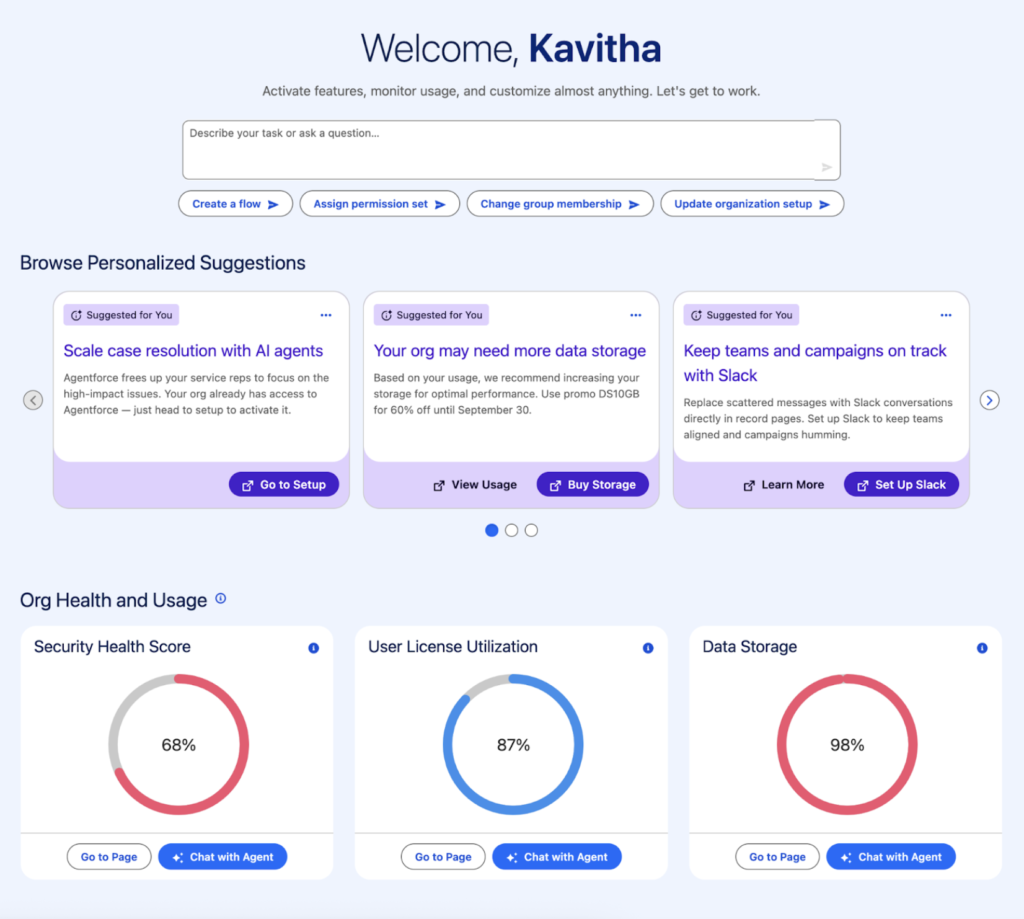
Image Credit: Salesforce
Real-life Admin Use-Cases
Scenario 1: A User Can’t Edit a Record
A sales rep messages you saying they can’t update the Opportunity Stage.
Instead of checking profiles, permission sets, and field-level security manually, you can ask:
Why can’t Emily edit the Stage field on Opportunity?
Agentforce reviews her access and tells you exactly what’s missing.
Scenario 2: You Need a New Field During a Meeting
You’re in a requirements call, and someone asks for a checkbox on the Account for “Partner Verified.”
You can type: “Create a checkbox field on Account called Partner Verified.”
Agentforce prepares it instantly, saving you from navigating through Setup while sharing your screen.
Scenario 3: You Inherit a Confusing Flow
A legacy flow triggers unexpected behavior, but no one knows what it does.
Ask: “Explain this flow in simple words.”
Agentforce summarizes the purpose, logic, and main decision points so you can fix or update it confidently.
Scenario 4: An Error Pops Up, and You Need a Quick Explanation
A user reports an error message that looks like a wall of technical text.
You can paste the error and ask:
“What does this error mean and how do I fix it?”
Agentforce breaks it down and proposes likely solutions.
Scenario 5: Your Org Needs Cleanup Before a Release
You want to prepare for a big deployment and reduce clutter.
Ask: “Show me inactive flows or rules that are safe to remove.”
Agentforce identifies unused automations, helping you clean up with less manual digging.
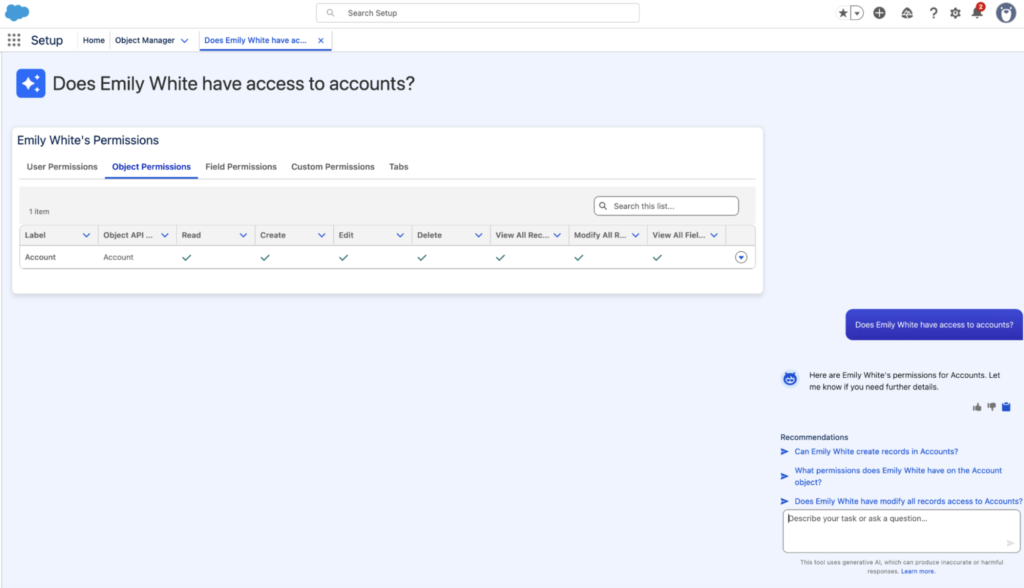
Image Credit: Salesforce
Looking to learn Salesforce Flow? Check out the complete Salesforce Flow Mastery Course here
FAQs
1. How to use Agentforce for setup in Salesforce?
To start using generative AI features in Salesforce, you’ll first need to turn on Einstein. Before doing that, make sure Data Cloud is set up and enabled in your org because it is required for key Einstein capabilities such as the Trust Layer.
When everything is ready, go to Setup and search for Agent in the Quick Find box. Select Agentforce Agents.
If you don’t see this option, check that Einstein Generative AI is enabled for your org.
Once confirmed, turn on Agentforce to activate it.
2. How to create an Agentforce Agent in Salesforce?
Agentforce Builder is a visual workspace where you can create, customize, and manage agents for both employee and customer use case.
Conclusion
Agentforce for Setup is slowly reshaping how admins get work done in Salesforce. Instead of spending time fixing small issues, you now have a helper that understands your org and responds to simple instructions. It takes care of the routine stuff, makes tricky setup tasks easier to handle, and gives admins more time to focus on the work that actually matters.
For now, Salesforce is offering Agentforce for Setup through a limited pilot, with a broader beta planned for December 2025.