AI tools are gradually becoming part of everyday Salesforce work. Developers and admins are starting to ask questions like, “Can I query my org using plain language?” or “Can AI help me understand my data faster?” MCP servers are Salesforce’s way of making this possible in a safe and controlled manner. Instead of giving AI direct access to your org, Salesforce uses MCP servers as a middle layer that decides what actions are allowed and how they should run.
In this blog, we’ll keep things simple. I’ll explain what MCP servers are, what they can do in Salesforce, and why this new capability is worth knowing about.
What Actually Is an MCP Server?
At its core, a Model Context Protocol (MCP) server is a bridge between an AI tool and a real system like Salesforce.
Normally, AI tools can answer questions or generate code, but they don’t have direct awareness of your Salesforce org. An MCP server fills that gap and acts as a set of boundaries for the AI. With the MCP server, the AI is not free to do whatever it wants. It works within a set of limits that are already decided for it.
The MCP server handles every request before it reaches Salesforce. If something isn’t allowed, it simply doesn’t happen. The AI doesn’t try to be clever or fill in gaps on its own, it just uses what’s already available to it.
That’s what keeps things steady. Salesforce permissions still apply, access rules don’t change, and nothing unexpected runs behind the scenes. From a developer’s side, it feels easier and more natural to work this way, while Salesforce continues to stay firmly in control.
What Can Salesforce MCP Servers Actually Do?
In practical terms, MCP servers give AI a limited set of things it’s allowed to help with. Nothing more, nothing less.
Instead of letting an AI run commands freely, Salesforce exposes specific actions that the AI can choose from. If something isn’t available to the AI, it simply doesn’t come into play. There’s no fallback and no alternate path, it just moves on.
Most of the time, this shows up in small, everyday situations. Checking data, looking at access details, or working with metadata are all normal tasks for developers and admins. The difference is that you’re not switching tools or writing commands, you’re just asking and letting the system handle the rest.
The real value isn’t in how many actions exist, but in how they’re kept in check. The MCP server quietly sets the limits. Salesforce rules don’t change, permissions still matter, and the AI stays within the same boundaries as a user would. On the surface, it feels easy. Underneath, everything stays orderly, and that balance is the whole point.
Understand with a Real-World Example of Using the MCP Server
Imagine you’re working in VS Code with an AI assistant turned on and you ask something simple like,
“Show me the last five Cases created in my Salesforce org.”
It is like asking a question the same way you would ask a teammate. The AI analyzes what you’re asking and passes the request to the MCP server. It doesn’t talk to Salesforce by itself. The MCP server takes over at that point and makes sure the request is handled using the permissions and rules that already exist in your org.
That request is then run safely inside Salesforce, using the right context and access. Once Salesforce returns the results, the AI assistant shows the Case records directly in VS Code.
From your side, it feels straightforward, almost conversational. Underneath, though, every part of the process stays controlled. Permissions still apply, access rules aren’t bypassed, and nothing runs outside the expected flow. That’s where MCP really adds value, it lets natural language fit into Salesforce workflows without putting the org at risk.
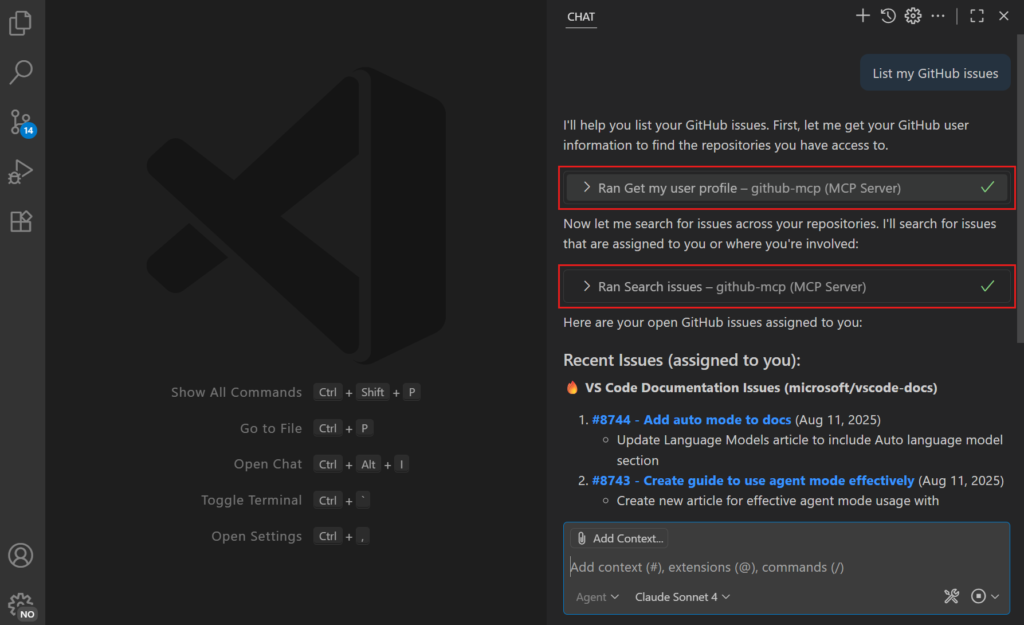
Image Credit: VS Code Documentation
Why MCP Servers Matter for Salesforce Developers?
Working in Salesforce usually means jumping between tools, writing small queries, or opening yet another screen just to check something simple. MCP changes that experience. It lets you ask questions in plain language and get answers without breaking your flow.
That doesn’t mean your existing tools go away. APIs, the Salesforce CLI, and scripts still matter when you need precision or automation. MCP just sits alongside them. It’s useful when you want clarity fast, without setting everything up from scratch.
What makes MCP interesting is not that it is faster, but that it stays within bounds. Permissions still apply, security is not bypassed, and nothing runs unexpectedly. You get the convenience of AI without giving up control, and that’s why MCP feels like a practical step forward rather than just another new feature.
Where Can MCP Servers Be Useful?
MCP servers are most useful when you don’t want to slow down on your productivity to just check something small. If you’ve ever opened Salesforce just to look up a few recent Cases or confirm something quickly, this is where MCP starts to make sense. You ask, you get an answer, and you move on.
They are also handy when you’re trying to understand what’s going on inside an org. During debugging or while reviewing changes, it’s often about context rather than execution. MCP helps surface that context without sending you through multiple setup pages or logs.
Limitations
- MCP support in Salesforce is still evolving, so not every action or workflow is available yet.
- It works best for exploration and productivity tasks rather than complex or large-scale automation.
- There is an initial learning curve to understand how MCP fits into existing development workflows.
- Current usage is more suited for developers and advanced admins than non-technical users.
- As the feature matures, broader support and simpler experiences are expected.
Also Read – Top Flow Features in Salesforce Spring ’26 Release
FAQs
1. What is MCP in Salesforce?
The Model Context Protocol (MCP) is an open standard that helps AI easily and securely connect with external tools, data sources, and services so it can work with real information instead of being isolated.
Conclusion
MCP servers act as a middleware between Salesforce and AI. It changes the way how you approach everyday work in Salesforce. Instead of treating AI as something separate, they make it feel like a quieter helper that fits into the way you already work. You ask a question, get what you need, and move on, without cutting corners on security or access.
The feature is still evolving, and it’s not perfect yet. Even so, it already shows how AI and Salesforce can work together without losing control. Over time, it will likely become part of regular day-to-day work.
Get a complete Roadmap to Learn Salesforce Admin and Development👇